Content
Try for freeJuly 2026 product updates
Product Updates
August 18, 2026
Product Updates
August 18, 2026

July was a payments and pricing release. You can now show every visitor prices in their own currency from a single paywall, control more of what your customers see at checkout across Stripe, Zotlo, and Primer, and drive more of the cabinet over the API and MCP. Here's everything that shipped.

Katya Madonova
web2wave
Multicurrency paywalls and prices
One paywall setup can now show every visitor prices in their own currency. The currency switches automatically based on the visitor's IP, so buyers see their own money while you maintain a single setup.
A few details worth knowing:
- Works with Stripe, Primer, Paddle, and Zotlo
- Import currencies you already have, or add new ones and we convert and round them to a clean number, paid trials included
- Currencies with no "cents," like the Japanese yen and Colombian peso, are now handled correctly
How to turn it on
- Open a price, add or import currencies, and save
- Open the paywall and turn on auto currency switching
To measure the impact, clone the paywall, turn switching on for the copy with the same prices, and compare the two in an A/B test.
More control over payments and pricing
One-click Zotlo price import
Import all your Zotlo prices into web2wave in one click, as both Live and Test, with every currency included. Go to Plans & Prices, then Import, then Zotlo. This replaces the previous flow, where each price had to be recreated in web2wave by hand.
Custom Stripe statement descriptors
Control what appears on your customers' card statements. Set a custom suffix at the project level, or override it per price, so transactions show a consistent, recognizable name instead of auto-generated text.
Zotlo custom metadata
Send custom user properties to Zotlo when you open the paywall. Map any user attribute to Zotlo's metadata fields, the same way you already can with Paddle, to keep first-party data in sync with your payment gateway.
Primer checkout form blocks
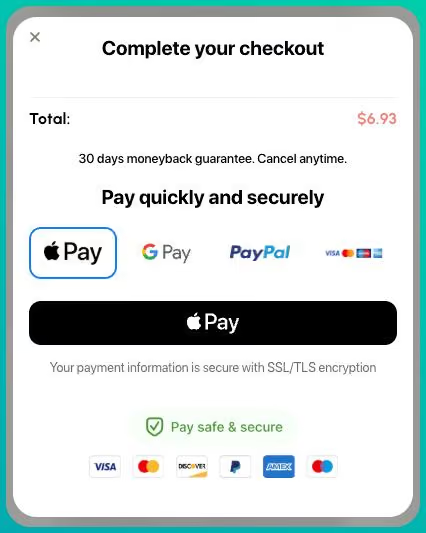
New Primer Tabs, Accordion, and Adaptive Buttons blocks let you customize the Primer form. Google Pay, Apple Pay, and PayPal each get their own block, so you can place any payment method anywhere on the page.
New paywall and quiz controls
Show paywall blocks by price tier
Hide or show paywall blocks based on the plan a visitor selects, using the new "Show on price" dropdown in the block editor. Use it to surface plan-specific content, images, or calls to action, or to add scarcity messaging to your most popular plans.
Progress bar and circle popup answer tracking
Answers from Progress Bar and Progress Circle popups now save automatically in your analytics. Every button click is recorded under a unique identifier, so you can see how visitors interact with these elements in the quiz flow.
A bigger API, driven by MCP
More of the cabinet is now available over the API, and the MCP at mcp.web2wave.com can run it end to end. Connect it to your Claude, Cursor, or Codex from the MCP server docs.
Async CSV exports
Export user visits, quiz answers, A/B experiment results, experiment user IDs, and subscriptions. Start a job, poll its status, and get a signed download URL.
Quiz answer AI insights
Generate AI readouts over your quiz answers: check quota, generate, poll, and fetch history. Useful for questions like "what are people answering?" and "what ads should I create for this audience?"
Project analytics
Pull paginated, project-wide user visits with filters for UTM, country, events, experiments, and properties. The same filters are available on the visits export.
Experiments via API
Create quiz or paywall variants, update their status through draft, active, pause, stop, and archive, and pull results snapshots with AI verdict helpers.
Reply-to address for Resend emails
Set a custom Reply-To for everything sent through Resend, including transactional email, sequences, and client portal login. When visitors reply to your quiz or paywall emails, responses go to the address you choose, with no Resend email setup required.
Analytics updates
See when users cancel
The Cohorts tab now shows the time between when a subscription starts and when it is cancelled, so you can spot where churn clusters in the lifecycle.
Google Ads and AppLovin AXON event mapping
Subscribe and StartTrial now map to standard events: purchase for Google, and subscribe for AppLovin AXON. Full details are in the events reference.
Get started
Every feature above is live in your account. If you want a hand setting any of them up, reach out to the team and we'll walk you through it.
Share this Article
Build your web funnel with web2wave
Start using web funnels: Launch faster, convert better, and keep more revenue with no app store limitations